
TALON Help Center
Editing Member Profile
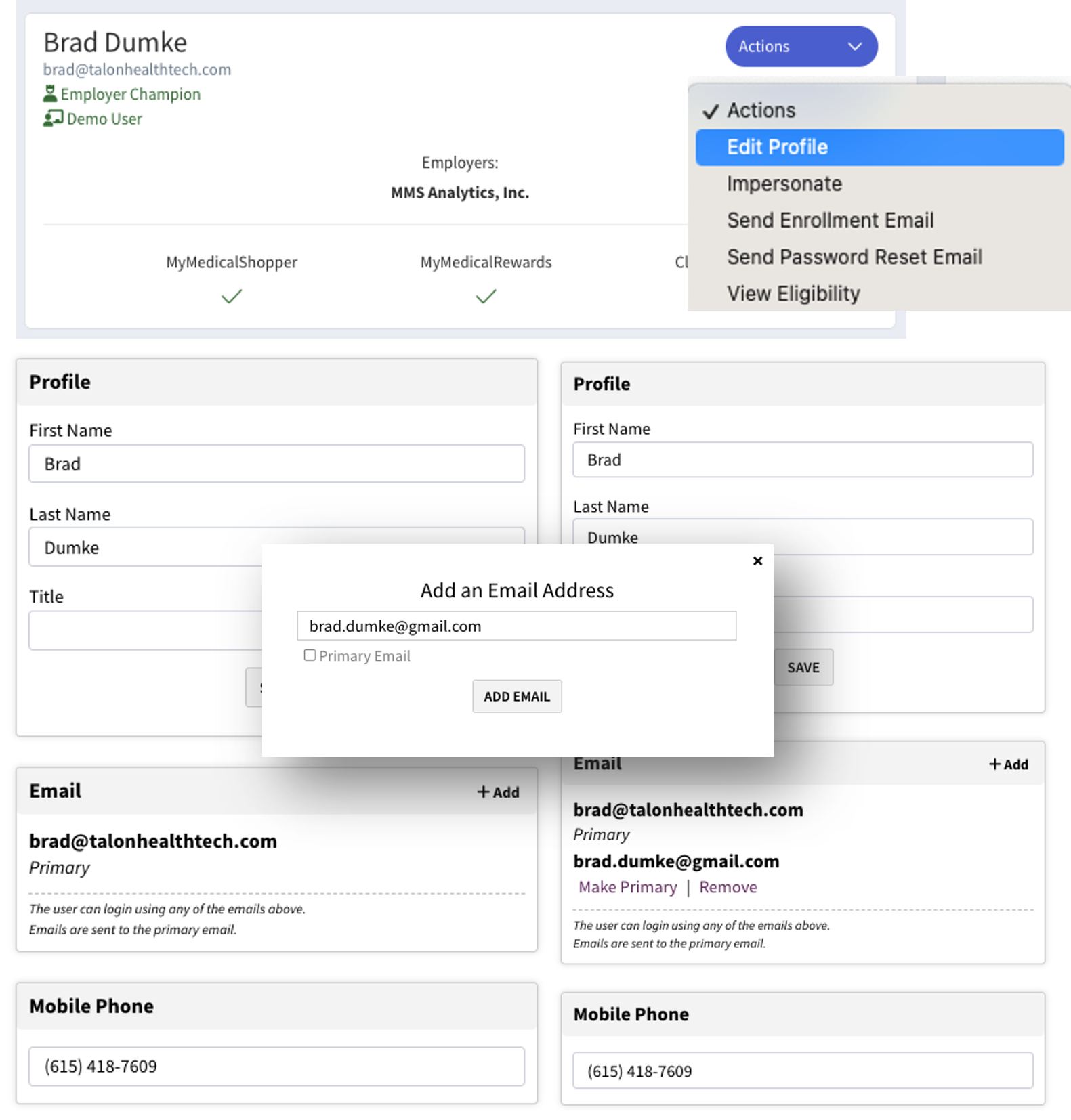
Understand how to edit Member Profiles. The most common reason Members have trouble logging in is that they're using an email address that's different than the one we received via eligibility. When that's the case, additional email addresses may be added, and the 'Primary' designation may be added to any of them. Outbound emails from TALON go only to the Primary email address.
Important Note
No edits made in this section change eligibility. If the desire is to update eligibility, then the changes should be made at the source and TALON will receive the update via the eligibility feed.
TALON CSM Role
Orient Primary implementation contact on how to navigate to edit Member Profiles.
Client Role
Add an additional email to their own or any Member record so they understand how it's done.
Process
Confirmation Steps
-
Go to the User Details Page and click the 'Actions' button.
-
Select 'Edit Profile'.
-
Add or edit the mobile phone if desired. If a new email is desired, in the Email Section, choose '+Add'.
-
Add a new, unique email address and, if desired, designate the new address as Primary.
-
Once multiple emails are associated with a User Record, the Member can log in using any of them. And any may be designated Primary.