
Outbound MRFs
TALON CSM Role
Orientation on the creation of outbound MRF's (at the end of each month for every Employer Group/Plan with at least one enrolled Member); the 'Employers' table within the Support Dashboard; and the Export Employers Report that includes outbound MRF URL's.
Client Role
Distribute outbound MRF URL's to Employer Groups/Plan Sponsors. This is a one time event per Employer Group, as the URL does not change with Monthly updates.
Process
Confirmation Steps
-
Navigate to the Employer Tab within the Support Dashboard.
-
View an outbound MRF page.
-
Create the Export Employers report.
Example MRF URL
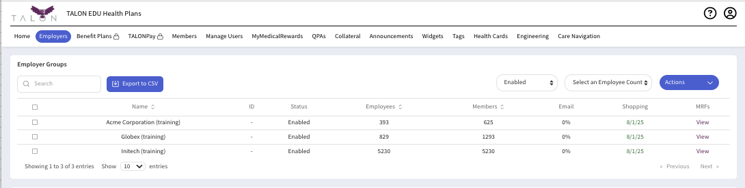
https://www.mymedicalshopper.com/mrf/acme-corporation-training
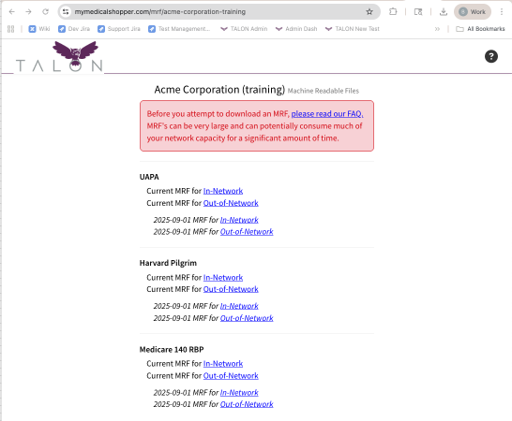
One page per Employer Group; MRF's per Plan within that Employer Group.
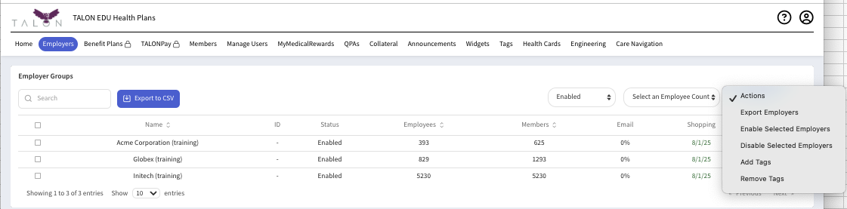
Export Employers...

... Results in this report...
TPA-Hosted MRF URLs
In the rare case when an Employer Group does not have a publicly facing web site to host their MRF URL, the TPA may choose to host on their behalf. When that is required, the CSM will edit the TPA's slug into the following URL format:
https://www.mymedicalshopper.com/mrf-search/<< tpa slug >>
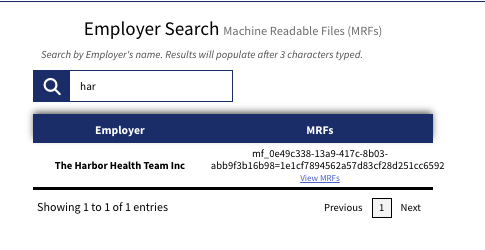
Once edited, that URL will be shared with the Employer Groups that have no public web site, where they will find a search box that requires the entry of at least the first three letters of the Employer Group name. Clicking 'View MRF's' will lead to the same Employer Group specific MRF page illustrated above.